
Proxmox Backup Server was created precisely for this purpose: to help you manage backups in a structured, reliable, and consistent way that fits your infrastructure while remaining easy to manage. If you already use Proxmox VE, it is one of the most natural and effective solutions for setting up a centralized backup system.
What is Proxmox Backup Server (PBS)
Proxmox Backup Server is open-source backup software designed for backing up virtual machines and containers. It is designed to store data efficiently, minimize storage requirements, and simplify recovery in the event of an error, system failure, or data loss.
Unlike other solutions, with PBS you can:
- manage backup snapshots
- reduce storage space through deduplication and compression
- verify data integrity
- restore data quickly and reliably
The main features of PBS
Proxmox Backup Server includes all the features needed for professional backup management:
- incremental backups
- chunk-level deduplication
- data compression
- VM, container, and file restoration
- regular backup checks
- retention policies
- pruning and garbage collection
- synchronization with remote repositories
- client-side encryption
This suite of features makes it more than just a backup tool: it is a structured platform for data protection and business continuity.
Why choose open-source backup software
One of the main advantages of Proxmox Backup Server is that it is open-source software, which means you are not tied to any specific vendor. This means you can design your infrastructure to suit your specific needs, choosing your own hardware, storage, and retention policies.
For businesses and IT departments, this means greater transparency, less vendor lock-in, and more design flexibility. If you already use Proxmox VE, native integration significantly reduces operational complexity.
How Proxmox Backup Server works
The process is straightforward. Data is sent from clients to the backup repository, divided into chunks, compressed and deduplicated. Each backup is then made available as a recoverable snapshot.
Space management is based on three distinct mechanisms:
- Prune: applies retention rules and selects which snapshots to keep
- Garbage collection: removes chunks that are no longer referenced
- Verify: checks the integrity of stored data
This is a very important distinction because it clarifies a point that is often misunderstood: deleting a snapshot does not immediately free up space on the datastore.
When should you use Proxmox for backups?
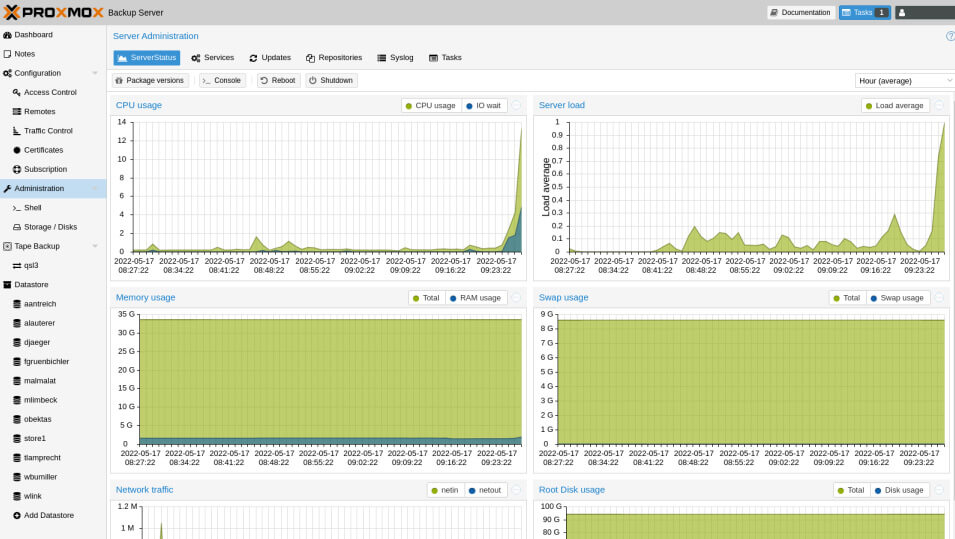
Using Proxmox Backup Server gives you a solution that is fully integrated with your virtual infrastructure, storage-efficient, and easy to manage. In a Proxmox VE environment, PBS integrates as dedicated backup storage and enables you to manage backups and restores through a streamlined workflow.
One of the key benefits for system administrators is efficiency: the first job saves the initial dataset, while subsequent jobs transfer only new or modified data. This reduces network traffic, backup times, and disk usage, particularly in environments with many VMs or tight operational windows.
How to install and configure Proxmox Backup Server
Installation can be carried out using the official ISO image or on a supported Debian system. In both cases, it is important to set up the storage correctly: the datastore is the heart of the system and has a direct impact on reliability and performance. In production environments, it makes sense to define pruning, garbage collection, and verification processes right from the start. An unmaintained repository tends to become less predictable and more difficult to manage over time.
Performing a backup with Proxmox
The steps outlined above provide a brief overview: if you would like more detailed information or wish to avoid errors during configuration, our systems engineers can assist you directly with the design and setup of the backup system:
- installing and securing the backup server
- creating the datastore and checking available storage
- connecting PBS to Proxmox VE
- configuring the backup job
- defining the retention policy
- scheduling verifications and garbage collection
- performing a test restore. This is the step that distinguishes a properly configured backup from a truly effective protection strategy. Without a test restore, there is no operational certainty that the data is actually recoverable
A quick checklist before going live
Before considering the setup complete, check the following points:
- datastore created and accessible
- sufficient storage capacity for the expected retention period
- users and permissions configured correctly
- server fingerprint verified
- backup jobs scheduled
- verification jobs scheduled
- garbage collection enabled
- at least one successful test restore
- remote or off-site backups configured, if applicable
This stage is crucial for avoiding problems down the line.
Comparison of Proxmox with other backup tools
Among its many advantages, one that should certainly not be overlooked is how well PBS integrates with the Proxmox ecosystem, compared to other backup tools. In an infrastructure based on Proxmox VE, there is no need to add complex layers or external connectors to achieve an efficient backup platform. The comparison:
| Aspect | Proxmox Backup Server (PBS) | General-purpose backup tool |
|---|---|---|
| Integration with Proxmox VE | Native | Often indirect |
| Data deduplication and incremental backup | Integrated | Depends on the product |
| Repository management | Centralized | Variable |
| Granular restore | Immediate | Not always immediate |
| Retention and verification | Native and integrated | Sometimes more complex |
| Operating cost | Often lower | Variable |
Is PBS the right choice?
Yes, PBS is a practical solution for protecting VMs, containers, and data efficiently. It enables you to move from basic backups to a structured, verifiable, and sustainable data protection strategy. If you work in a Proxmox environment, it is one of the most logical choices available.