
Sizing Proxmox Backup Server is not simply a matter of checking whether the system has the minimum amount of RAM or sufficiently large disks. In a business environment, you also need to consider how much data must be protected, how frequently it changes, how long backups must be retained, how many jobs will run at the same time and how quickly services need to be restored.
PBS performance depends on the right balance between CPU, memory, storage and network resources. Upgrading a single component will not necessarily solve a performance problem. A fast CPU, for example, cannot compensate for an underperforming datastore.
This article explains how to collect the information required and translate it into a configuration suitable for a production environment.
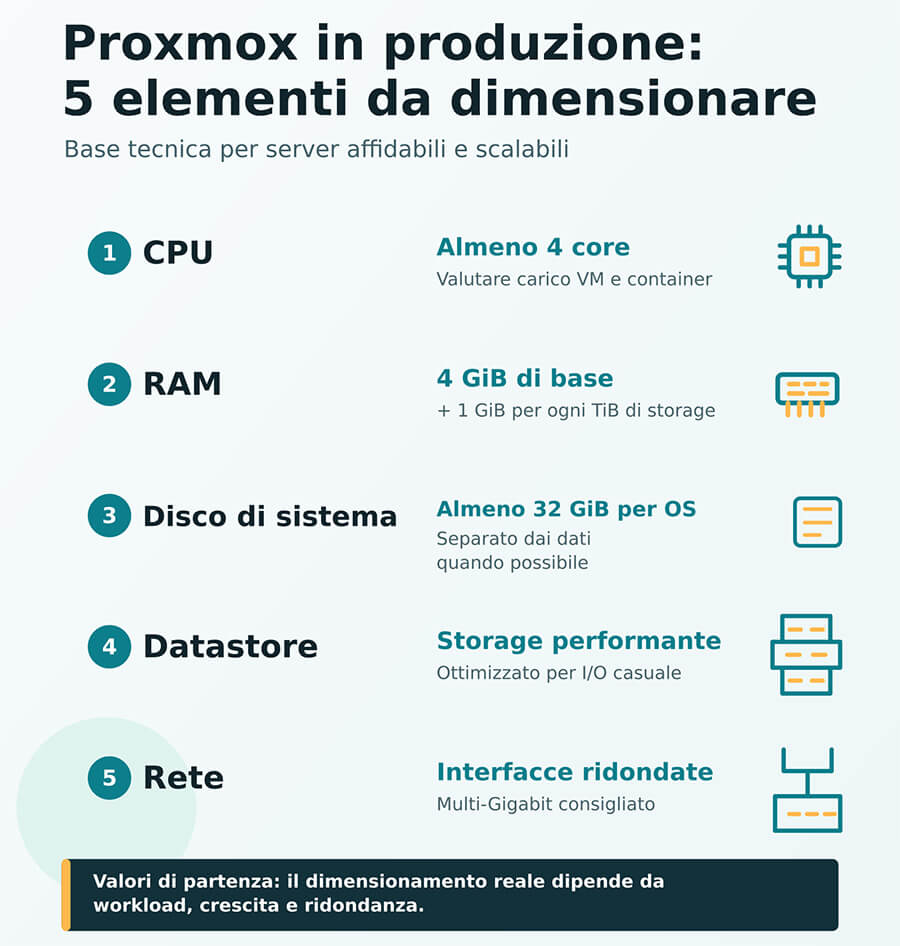
Proxmox recommends a CPU with at least four cores, 4 GiB of RAM plus an additional 1 GiB for every TiB of storage, at least 32 GiB of disk space for the operating system, drives capable of delivering good random-access performance and redundant multi-gigabit network interfaces.
These figures provide a useful technical baseline, but they do not represent a suitable configuration for every infrastructure.
To explore the platform’s features, read our Guide to Proxmox Backup Server.
Minimum and recommended Proxmox Backup Server requirements
The official documentation distinguishes between the minimum requirements for evaluation purposes and the recommended specifications for a production server.
| Component | Evaluation and testing | Production |
| CPU | x86-64 processor with at least 2 cores | Modern AMD or Intel CPU with at least 4 cores |
| RAM | 2 GB | At least 4 GiB plus 1 GiB for every TiB of storage |
| System disk | More than 8 GB | At least 32 GiB of available space |
| Backup storage | Not specified | High-performance storage suitable for random-access operations |
| Network | One network interface | Redundant multi-gigabit interfaces |
The minimum requirements are explicitly intended for evaluating the software and should not be used as the basis for a production system. Proxmox also recommends server-grade hardware, enterprise SSDs for the best performance and a dedicated metadata cache when the datastore uses HDDs.
These specifications answer the question “Can PBS run on this system?”, but they do not yet answer the more important question “Can it complete backups, verification jobs and restores within the timeframes required by the business?”.
To answer that, each component must be assessed separately.
How many CPU cores does Proxmox Backup Server need?
The four cores recommended by Proxmox should be treated as a starting point. The number actually required depends primarily on the workload and how many activities will be performed concurrently.
The CPU is used for:
- deduplication and compression
- checksum calculation and verification
- concurrent backup jobs
- snapshot verification
- pruning and garbage collection
- restoring VMs, containers and files
- synchronization with remote datastores
The number of virtual machines alone is not enough to estimate the workload. Ten large VMs with high change rates may require more resources than fifty relatively inactive VMs.
Before selecting a CPU, you should therefore establish:
- the maximum number of concurrent jobs
- the length of the available backup window
- how frequently verification jobs will run
- the volume of data processed each day
- the number of restore operations that may overlap
- whether data will be synchronized with remote sites or S3 storage
When jobs are mainly run sequentially and the available backup window is generous, a configuration with fewer cores may be sufficient. If several systems must be protected within the same limited timeframe, greater processing capacity will be required.
How much RAM does Proxmox Backup Server need?
Proxmox recommends at least 4 GiB for the operating system, filesystem cache and PBS services, plus at least 1 GiB for every TiB of managed storage.
A system with 20 TiB of storage would therefore start with a theoretical minimum recommendation of 24 GiB:
- 4 GiB for the operating system, cache and services
- 20 GiB for the 20 TiB of storage
This figure should not be treated as the final configuration. Additional headroom should be provided when the environment includes:
- a ZFS filesystem
- numerous concurrent jobs
- a large number of snapshots
- frequent verification jobs
- short backup windows
- remote synchronization
- significant storage growth
If the datastore is expected to grow from 20 to 30 TiB during the server’s lifecycle, the memory should be sized for the future scenario rather than the initial storage usage alone.
RAM and ZFS
ZFS also uses memory to improve storage management and performance. As a general guideline, the installer documentation suggests 4 GB plus 1 GB of RAM for every TB of raw disk capacity when ZFS is used.
Using ZFS does not mean that memory should be allocated without limit. It does, however, mean that a ZFS datastore should not be designed around the minimum PBS memory requirement alone.
Separating the system disk from the datastore
The disk on which Proxmox Backup Server is installed and the storage used for backups perform different roles.
Operating system disk
The system storage contains Debian, Proxmox Backup Server, configuration files, logs and packages.
For production environments, Proxmox recommends at least 32 GiB of available space and a redundant configuration.
The suggested options are:
- hardware RAID with battery-backed write cache
- a redundant ZFS configuration
ZFS should not be installed on top of a hardware RAID controller because it requires direct access to the disks.
In production, it is generally preferable to separate the operating system from the datastore. This makes it easier to manage:
- maintenance and updates
- device replacement
- available storage capacity
- PBS configuration recovery
- I/O troubleshooting
Backup datastore
The datastore contains snapshots, indexes and deduplicated chunks. PBS uses directories within supported filesystems such as ext4, XFS or ZFS. Its performance does not depend solely on the sequential speed of the disks. During backup, verification, garbage collection and restore operations, the system performs a large number of random operations involving chunks and metadata.
A high-capacity but slow array may therefore complete ordinary backup jobs successfully but become a bottleneck during:
- concurrent jobs
- verification of large volumes of data
- garbage collection
- full restores
- recovery of large numbers of files
- service recovery following an incident
Storage capacity cannot be assessed separately from datastore IOPS and response times.
How to calculate the storage capacity required
There is no universal ratio between the size of the virtual machines and the capacity required by PBS. Actual storage requirements depend on:
- the initial volume of protected data
- the daily data change rate
- the retention policy
- the deduplication and compression achieved on the actual dataset
- expected growth
Actual protected data
Do not consider only the nominal capacity of the virtual disks. A VM with a 2 TB virtual disk may use only 600 GB, while a database with a smaller nominal capacity may generate a much larger volume of unique data over time.
The starting point should be the actual first backup, measured after deduplication and compression.
Data change rate
The change rate indicates how much new or modified data must be stored between one backup and the next. It can vary considerably between:
- application servers
- file servers
- databases
- document management systems
- VMs containing data that is already compressed
- media archives
- encrypted workloads
Applying the same generic percentage to every VM can easily produce an inaccurate estimate.
Retention
The retention policy determines how many recovery points are stored and for how long. It may include:
- hourly copies
- daily copies
- weekly copies
- monthly copies
- annual copies
PBS retains chunks for as long as they are used by at least one snapshot. A longer retention period can therefore continue to occupy storage space even after the corresponding data has been deleted from the original systems.
Deduplication and compression
Deduplication can significantly reduce storage usage when several VMs contain similar operating systems, applications or files. The benefit may be lower with:
- data that is already compressed
- videos and images
- compressed application backups
- encrypted databases
- files that are rewritten in full whenever they are saved
Storage sizing should not therefore be based on an assumed deduplication percentage. It is better to measure the result using a representative sample of the actual data.
A basic sizing formula can be expressed as follows:
required capacity = initial effective backup + unique data retained under the retention policy + expected growth + operational headroom.
This formula does not replace testing, but it avoids the common mistake of simply multiplying the total size of the VMs by the number of backup copies.
Simplified example
Assume that an initial observation period produces the following figures:
- first backup after deduplication and compression: 3.2 TiB
- average volume of new unique data: 70 GiB per day
- daily retention: 30 recovery points
- expected growth: 15%
After the first backup, the following 29 daily recovery points might require approximately: 29 × 70 GiB = 2,030 GiB. The estimated baseline would therefore be approximately: 3.2 TiB + 2 TiB = 5.2 TiB.
You would then need to add:
- data retained by weekly and monthly retention policies
- expected growth
- headroom for maintenance and workload fluctuations
This example illustrates the calculation method. Actual behavior must be verified using the company’s own dataset.
SSD, NVMe or HDD?
The choice of disk technology depends on the required balance between capacity, performance, restore time and budget.
| Technology | Main advantage | Typical use | Factor to assess |
| Enterprise NVMe | High IOPS and low latency | Numerous jobs and very fast restores | Cost per TiB |
| Enterprise SSD | Balance between capacity and performance | Business environments with limited backup windows | Endurance and power-loss protection |
| Enterprise HDD | High capacity at a lower cost | Extended retention and less intensive workloads | Random I/O performance and verification time |
| HDD with metadata cache | High capacity with faster metadata operations | Large ZFS datastores | Cache design and redundancy |
Proxmox recommends fast storage capable of supporting random I/O workloads. Enterprise SSDs are recommended for the best performance. When HDDs are used, Proxmox recommends a metadata cache, such as a mirrored ZFS special device.
In addition to the type of disk, you should assess:
- endurance
- redundancy
- power-loss protection
- recovery times
- controller compatibility
- availability of replacement parts
- warranty and support
- restore performance
Not every backup environment requires NVMe storage. An infrastructure with extended retention periods and less demanding recovery time objectives may use correctly sized enterprise HDDs. Conversely, a high number of concurrent jobs and frequent restores may make storage designed solely around capacity inadequate.
How to size the network
The network determines how much data can be transferred during the available backup window and how long a restore will take. Proxmox recommends redundant multi-gigabit interfaces for production systems. However, the required speed should be calculated on the basis of the actual data volume. If 2 TiB must be transferred within eight hours, you cannot rely solely on the nominal speed of the network interface. You must also consider:
- the throughput actually available
- traffic generated by other services
- concurrent jobs
- latency
- protocol overhead
- any off-site synchronization
- restore operations that may overlap with backups
In more complex environments, backup traffic should be separated using VLANs or dedicated networks. This prevents PBS jobs from competing directly with production workloads.
The network must also be assessed in the opposite direction. Completing backups quickly is not enough if a full restore would take longer than the company’s recovery time objective allows.
Can an existing server be reused?
An existing server can be repurposed for PBS if it provides sufficient capacity, reliability and independence from the systems it protects. Before reusing it, assess:
- the age and condition of the disks
- controller performance
- the maximum supported RAM
- available network interfaces
- disk and power-supply redundancy
- remote management capabilities
- energy consumption
- availability of replacement parts
- manufacturer support
- independence from the protected infrastructure
In the project completed for Union Gas e Luce, some existing servers were repurposed for Proxmox Backup Server and disaster recovery. This was possible because reuse formed part of a wider infrastructure assessment, not because any older server is automatically suitable for PBS.
Common mistakes to avoid
Using the minimum requirements in production
The minimum specifications are intended for installing and evaluating PBS, not for designing a reliable business system.
Sizing storage according to nominal VM capacity
Storage requirements should be calculated using the actual protected data, its change rate and the retention policy.
Assuming a fixed deduplication ratio
The result depends on the nature of the data and must be measured.
Filling the datastore to its maximum capacity
Headroom must be retained for growth, unexpected variations and maintenance operations.
Considering backup speed alone
The configuration must also meet the maximum acceptable restore time.
Ignoring maintenance jobs
Verification, pruning and garbage collection require adequate resources and suitable operating windows.
Hardware selection checklist
Before defining the configuration, collect the following information:
- number of VMs, containers and hosts
- actual volume of protected data
- average daily change rate
- required retention policy
- expected growth
- maximum number of concurrent jobs
- available backup window
- RPO and RTO
- frequency of verification and garbage collection
- maximum acceptable restore time
- need for remote or S3 copies
- redundancy requirements
- expected infrastructure lifecycle
- required level of support
This information allows you to move beyond Proxmox’s generic requirements and design a configuration that reflects the services to be protected. You can use the AXOL Server configurator to describe your current infrastructure, the capacity required and any backup or disaster recovery requirements.
From minimum requirements to a production-ready design
The official requirements provide a starting point. Actual sizing depends on the data, the retention policy and how quickly the business needs to restore its services. A correctly designed configuration must balance:
- available capacity
- datastore performance
- processing power
- memory
- network speed
- redundancy
- future growth
- restore times
For production environments, it is also advisable to assess access to the enterprise repository and the associated level of support. Find out more about the Proxmox VE and Proxmox Backup Server subscriptions available through AXOL.
How much RAM does Proxmox Backup Server need?
Proxmox recommends at least 4 GiB for the operating system, cache and services, plus at least 1 GiB for every TiB of storage. This figure should be reviewed in the context of ZFS usage, expected growth and concurrent activities.
How much storage does Proxmox Backup Server need?
It depends on the effective first backup, the unique data generated over time, the retention policy, the deduplication achieved and expected growth. Testing with representative data provides a more reliable result than applying a standard percentage.
Are SSDs required?
No. Proxmox recommends enterprise SSDs for the best performance, but enterprise HDDs can be used when capacity, metadata caching and operating windows are sized correctly.
Is a 10 GbE network required?
Not in every environment. Network speed should be selected according to the volume of data to be transferred, the available backup window and the required restore time.
Are the minimum requirements sufficient for production?
No. The minimum requirements published by Proxmox are intended exclusively for software evaluation.